


Challenges on exporting data in Google BigQuery
One notable feature offered by Google Analytics 4 (GA4) is its seamless capability to export data directly into Google BigQuery. However, this is only the starting point; the true challenge lies in effectively utilizing the exported data. How to link GA4 Property to Google BigQuery.
How much does a GA4 BigQuery cost?
Google BigQuery, which bills users based on query processing and table storage, is not a data warehouse everyone opts for. BigQuery Pricing
Linking Google Analytics 4 (GA4) with BigQuery and storing data in BigQuery is not entirely free. Although Google provides a restricted free tier with specific usage allocations, there are charges for exceeding these limits. The initial 1 TB of requests per month and 10 GB of stored data is offered as a complimentary service to all GA4 users.
Let’s say you’re looking to gather the total page views and unique users for a specific event category. This could be for the past month, the last three months, or even for an entire year. Keep in mind that conducting queries over longer time spans comes with noticeably higher costs. To provide some context, running a query for a full year can result in approximately twelve times the cost compared to a one-month query, assuming all other factors remain constant.
The Nested Table Structure
For many the exported data can be confusing, as it is spread across numerous distinct tables, each featuring complex nested, denormalized, and array fields. Therefore, comprehending and effectively working with this data, particularly for analytical tools, can be extremely challenging.
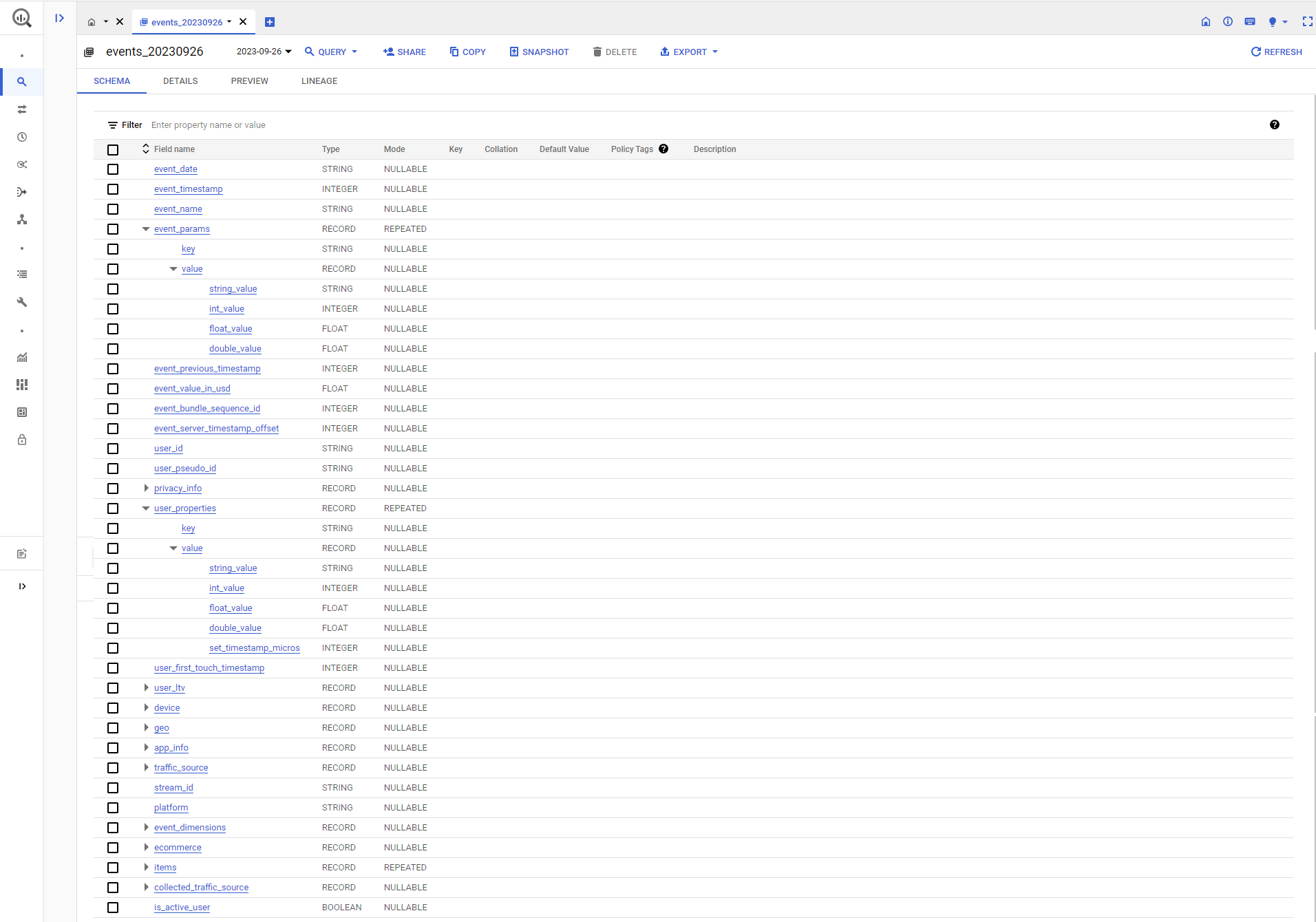
Some fields are structured as repeated records or arrays in Google Analytics 4 (GA4) export data to BigQuery. This is done to capture multiple occurrences of certain events or parameters associated with a single user interaction.
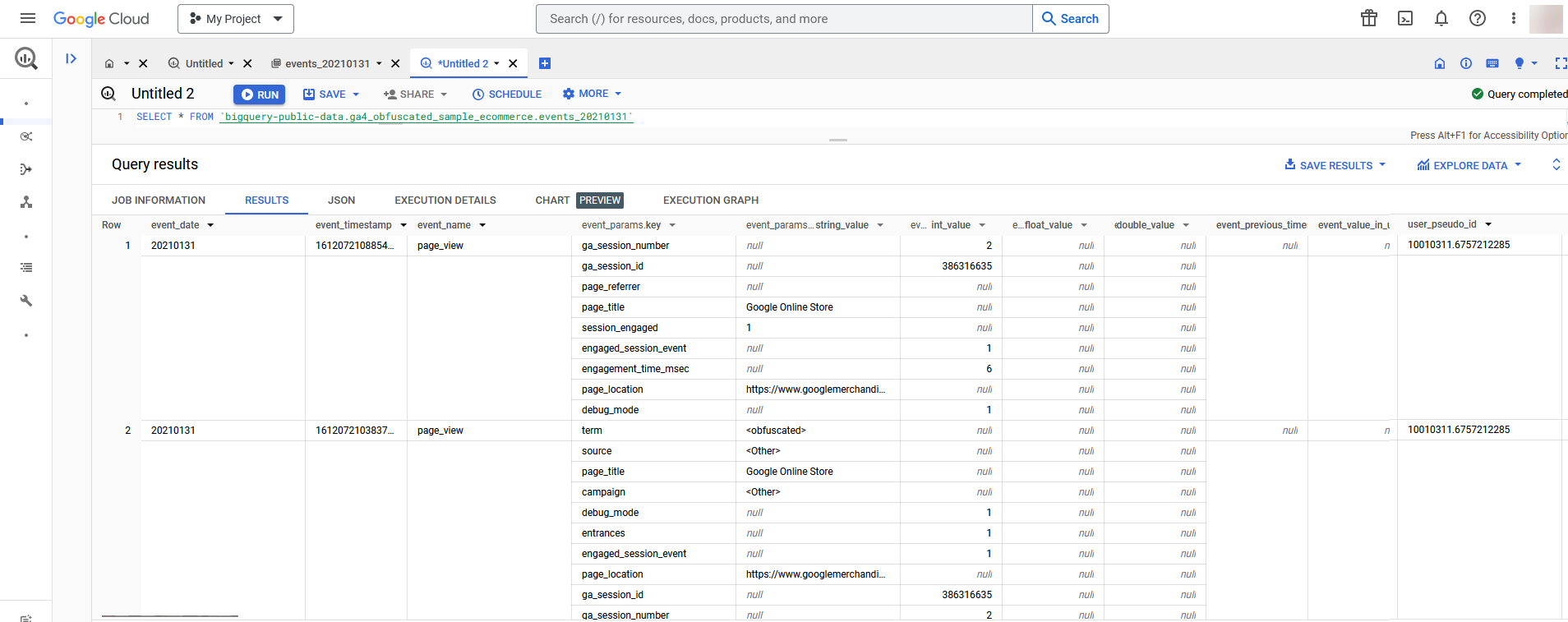
For example, consider an e-commerce website where a user can view multiple product categories in a single session. In this case, the GA4 BigQuery table may have a field like “event_params” that is structured as repeated data. This allows for capturing all the different product categories viewed by a user in one session.
Here’s a simplified example of what the data might look like in BigQuery:
The UNNEST function
Now since the GA4 data schema is a complex denormalized structure so to start to query your Google Analytics 4 Properties data, you’ll often need to flatten the nested and repeated data in BigQuery. To do so we need to make use of unnest function. It essentially transforms an array or a nested structure into a table, which allows for easier querying and analysis.
Using the UNNEST function in BigQuery, while powerful for working with nested and repeated data, does come with some potential disadvantages, particularly in terms of query optimization and costing:
Exploring alternative solutions for overcoming the challenge
Electrik.AI (Marketing Intelligence tool) is a well-equipped tool that address these challenges. The people are more accustomed with using standard and popular databases such as Azure SQL Server, MySQL, PostgreSQL, Snowflake, and others.
Numerous data professionals are proficient in working with spreadsheets, with a substantial portion favouring file-based storage for analytics data. To cater to their preferences, Electrik.AI also has seamless extraction and uploading to widely used file storage platforms like Azure Blob Storage,
Here are other databases and data warehousing options, apart from BigQuery, where you have the option to export your GA4 data.
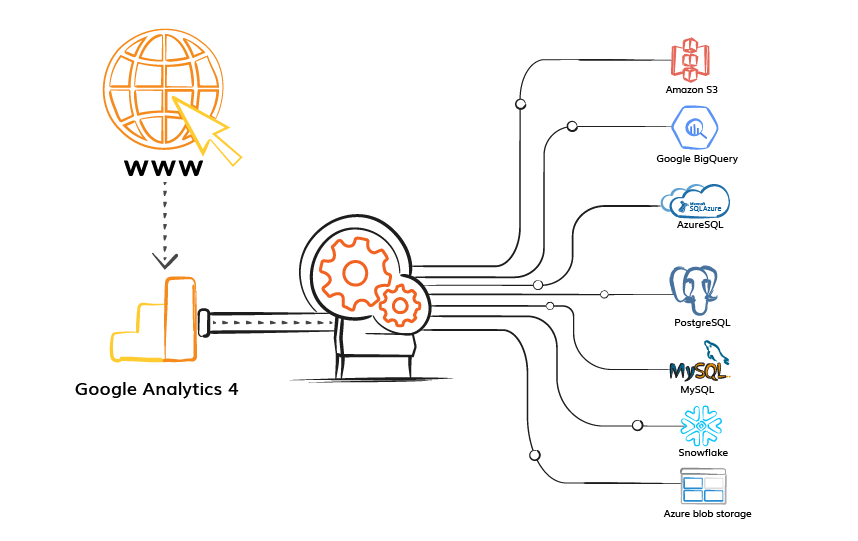
The beauty of exporting in your preferred database or file storage is that the data schema is completely normalized and easy to understand and transform. By exporting to your preferred database or file storage you not only gain ownership of the data but also the freedom to transform and utilize it according to the preferences of your chosen analysis tools.
Normalized the Google Analytics 4 Data Schema
Electrik.AI (Marketing Intelligence tool) is a well-equipped platform that address these challenges. We’ve transformed the intricate nested data structure in BigQuery into a simplified, normalized form, making it much more straightforward to comprehend and enabling more efficient querying. This transformation has made the data structure approximately 1000 times more accessible and manageable.
The beauty of exporting in your preferred database or file storage is that the data schema is completely normalized and easy to understand and transform. By exporting to your preferred database or file storage you not only gain ownership of the data but also the freedom to transform and utilize it according to the preferences of your chosen analysis tools.
How to use Electrik.AI to wrangle your Google Analytics data
Electrik.AI is a marketing intelligence platform to extract, collect and integrate data from various marketing channels such as Google Analytics, AdWords, Bing, Facebook, Shopify, etc. Electrik.AI is completely cloud-based, giving marketers point-and-click control to set up new data sources in minutes. Without you writing a single line of code we periodically load into Azure, Snowflake, Amazon S3, Azure BLOB, etc.
Google Analytics 4 Direct extractor by Electrik.AI is designed to export raw events from Google Analytics 4 properties and load it directly into your database/data warehouse. You do not need to have a BigQuery account to export raw events from GA4 properties. And you no longer need to bother about unnesting the property data or about merging the multiple events_YYYYMMDD tables.
With Electrik.AI’s Google Analytics 4 Direct connection, you can get daily report in the data warehouse or database of your choice. Electrik.AI makes it easy to get the data you want into a data warehouse in minutes so that you can focus on analysis and reporting.
Basic queries for Google Analytics 4 event data export
Wrapping up
I hope that this information will serve useful to you all! While I haven’t delved into the specifics of setting up the data pipeline, you can find comprehensive instructions here.